Skip navigation
Knowledge Base    Websites    Website Builder (v8): Reordering pages in Website Builder (v8)

Reordering pages in Website Builder (v8)

Last Updated: Dec 12, 2023

In order to reorder the pages of your website, please do the following.

Reordering pages

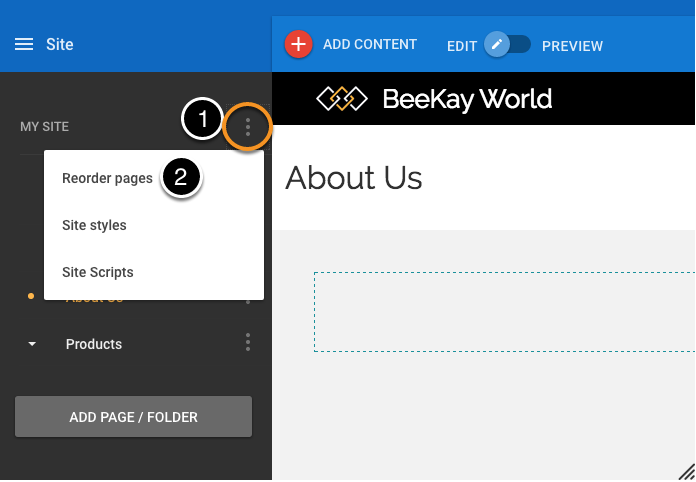
  1. Open the site options menu.
  2. Select Reorder pages.

Site styles menu

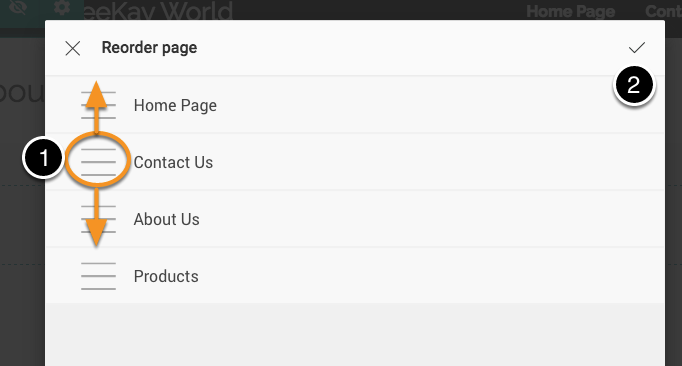
  1. Click on the Drag icon and drag the page up or down.
  2. Click Save.

Note: Only top level pages can be reordered. Reordering for pages in subfolders will be released in a later release.


Can't find what you're looking for? Contact our support team now
Open a Support Ticket
Submit a request

Anytime 24/7

Live Chat

Live agent:  24/7
Mountain Time, Denver, USA